How The Sentinel describes the shape of each tile
As described in the deep dive on tile data, the shape of the landscape in The Sentinel is stored in the tileData table, with one byte for each tile corner. This byte contains two vital pieces of information: the altitude of the landscape at that point, and the shape of the landscape at that point. In this article, we'll take a look at the latter, which we'll call the tile shape.
To see what the various tile shapes represent, take a look at the preview for landscape 9000:
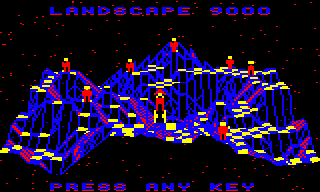
This landscape is stored as a 32x32 set of tile corners, which between them define a 31x31 grid of tiles. Each of these tiles has an associated tile shape.
The tile shape describes the structure of each tile. Seen from above, each tile is square, like a chess board; however, each tile corner can have a different altitude, so while some tiles are flat and have the same altitude at each corner, other tiles are slopes while others contain channels, and some even end up as shapes that don't lend themselves to simple descriptions.
It might help to imagine the 3D world as being made up of "tile cubes", with side lengths of one coordinate. If the bottom of the landscape is a flat chess board on the table in front of us, then we can build up our landscape by stacking lots of cubes on the board. Each cube fits nicely onto a chess board square, and the full 3D landscape can be made by stacking cubes on top of each other to create peaks and valleys. The final step is to carve each of the top cubes on the landscape into the correct shape to create the undulating world in the preview. The tile shape is therefore an encapsulation of this data: it is the shape of the top tile cube for each of the 31x31 tiles.
There are lots of tile shapes in the later landscapes, and landscape 9000 is no exception: it includes at least one of each tile shape. Let's take a look at them all.
Calculating the tile shape
--------------------------
The GetTileShape routine calculates a tile's shape by taking the set of four tile corner altitudes and comparing them. The result is a number from 0 to 15 that describes the tile shape (with the exception of shape 8, which is unused).
The tile's altitude is determined by the bottom-left tile corner, which is known as the anchor for that tile. The tile shape is therefore defined by the altitude of the tile anchor and of the three neighbouring tile corners. Specifically, let's consider a tile with a tile anchor at altitude S and with neighbouring altitudes of T, U and V, like this:
     ^           [T]  [U]
     |
     |           [S]  [V]
  z-axis
   into
  screen      x-axis from left to right --->
The tile shape is calculated as shown in the table below, where:
- 0 and 1 represent arbitrary altitudes that are in that order, with 1 being higher than 0.
- a, b represent arbitrary altitudes where a <> b <> 1.
- c represents an arbitrary altitude where a <> b <> c (and c can be 1).
Let's look at all the shapes; it's a lot easier to show than tell in this case...
Tile shapes
-----------
The table below shows all the different tile shapes. Note there is no shape 8, and shapes 4 and 12 can have multiple layouts. The face colours in the images have the following meanings:
- The red face points towards the front of the landscape.
- The brown face points towards the back of the landscape.
- The blue face is the shape itself, i.e. the top of the tile that is drawn in the game.
The images shown are just examples of that shape, as each shape has multiple variations depending on the altitudes: for example, the slope in shape 1 can be shallow or steep, depending on the altitude of the tile corners at altitude [1]. Other shapes have large numbers of variations, in particular 4 and 12, where the [a], [b] and [c] altitudes can be either side of altitude [1] in a number of combinations (shapes 4a, 4b and 12b have six variations, and 12a has even more).
There are further notes on the tile shapes following the table.
| Shape | Criteria | Layout | Example |
|---|---|---|---|
| 0 | S == V S == T S == U | [T] [U] [0] [0] | 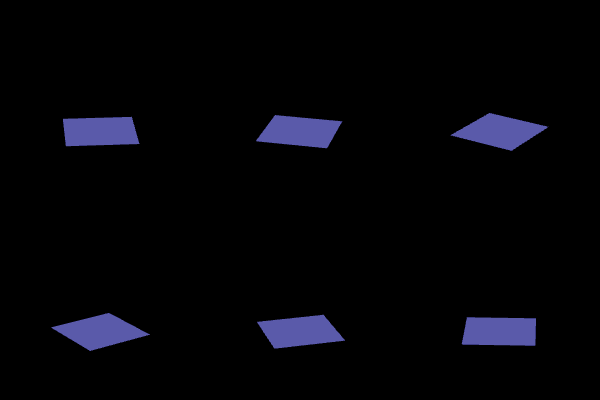 |
| 1 | S == V S <> T U < V U == T | [T] [U] [0] [0] | 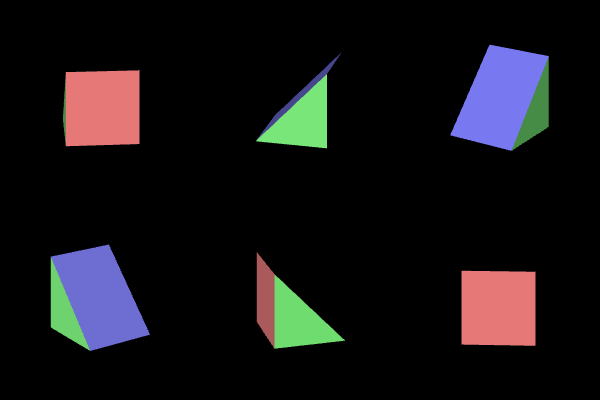 |
| 2 | S <> V S <> T S <= U U == V U == T | [T] [U] [1] [1] | 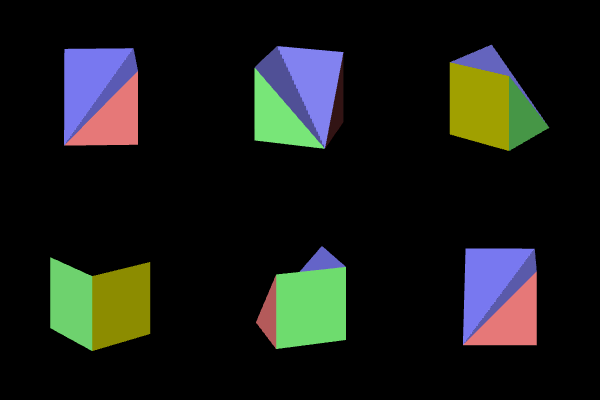 |
| 3 | S == V S == T S > U | [T] [U] [1] [0] | 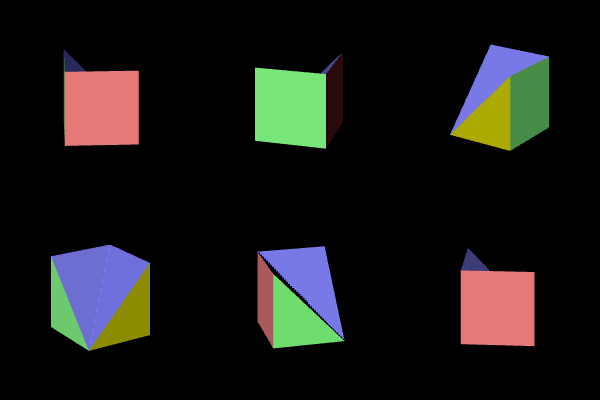 |
| 4a | S <> V S <> T U == V U <> T | [T] [U] [a] [1] | 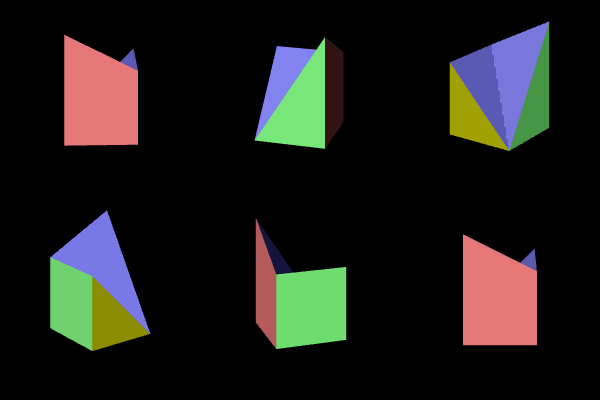 |
| 4b | S <> V S == T U <> V U <> T | [T] [U] [1] [a] | 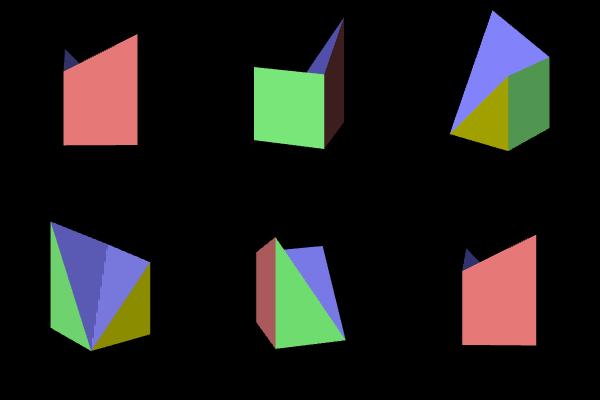 |
| 5 | S <> V S == T U == V U < T | [T] [U] [1] [0] | 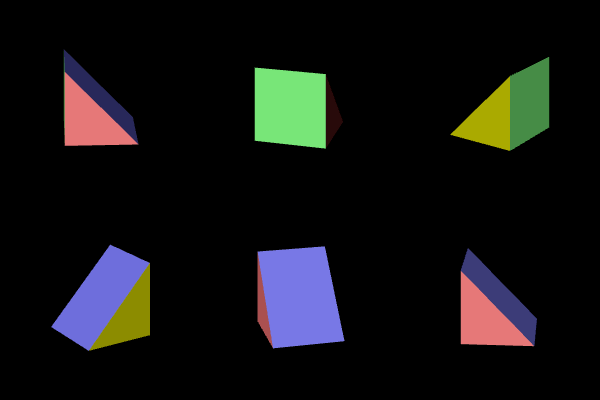 |
| 6 | S == V S <> T U == V U < T | [T] [U] [1] [0] | 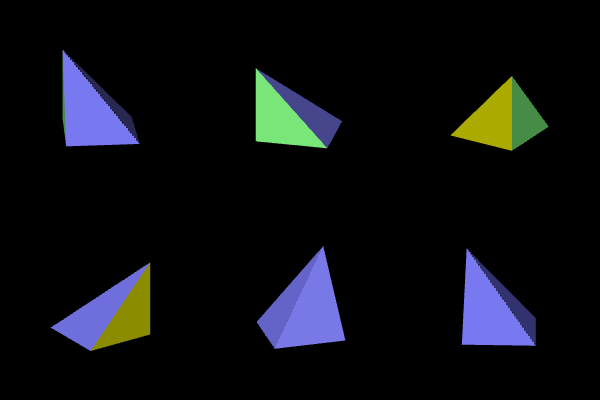 |
| 7 | S <> V S == T U >= V U == T | [T] [U] [1] [1] | 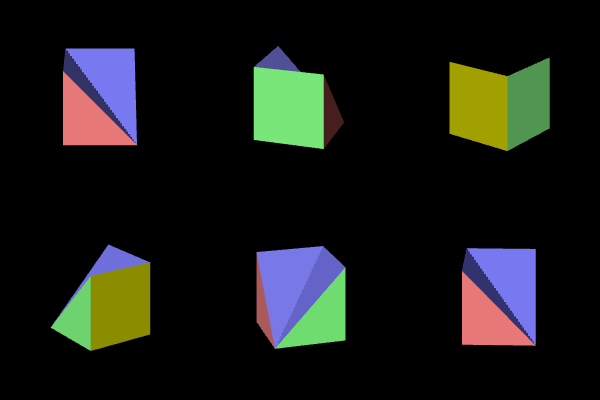 |
| 9 | S == V S <> T U >= V U == T | [T] [U] [1] [1] | 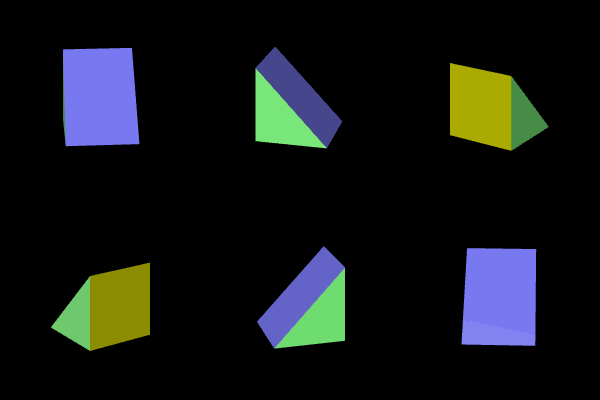 |
| 10 | S == V S == T S < U | [T] [U] [0] [1] | 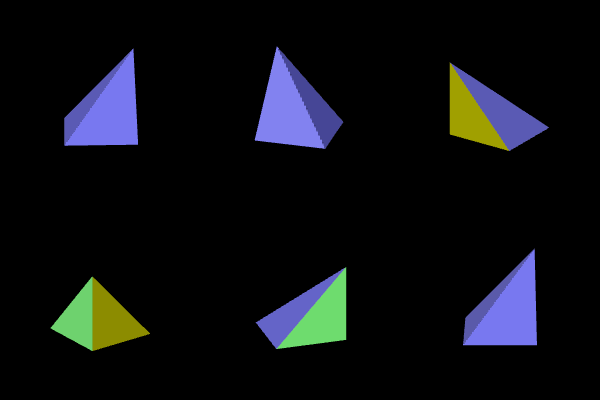 |
| 11 | S <> V S <> T S > U U == V U == T | [T] [U] [0] [0] | 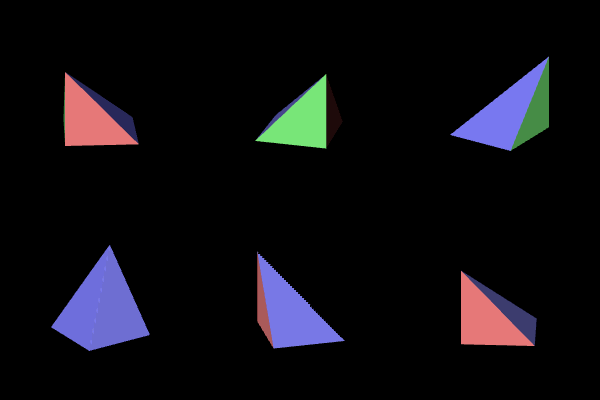 |
| 12a | S <> V S <> T U <> V | [T] [U] [1] [c] | 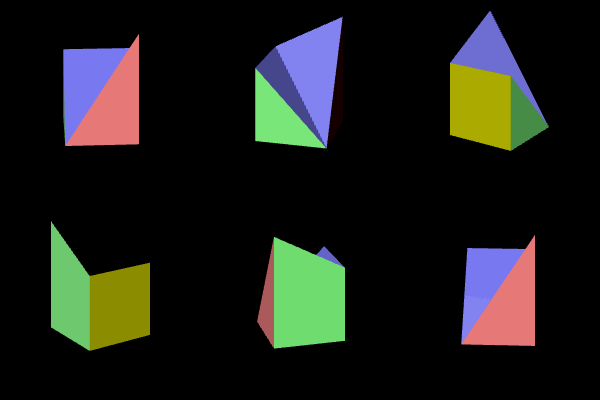 |
| 12b | S == V S <> T U <> V U <> T | [T] [U] [a] [b] | 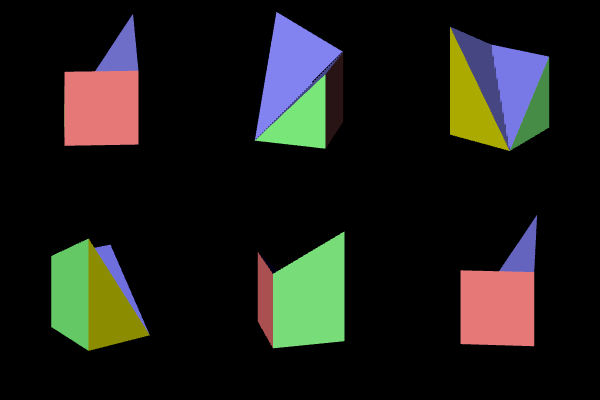 |
| 13 | S <> V S == T U == V U >= T | [T] [U] [0] [1] | 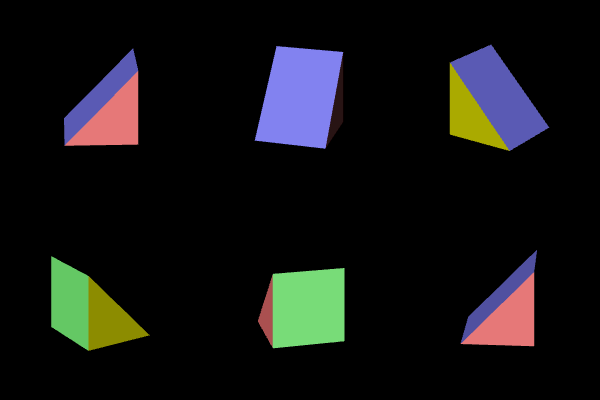 |
| 14 | S <> V S == T U < V U == T | [T] [U] [0] [0] | 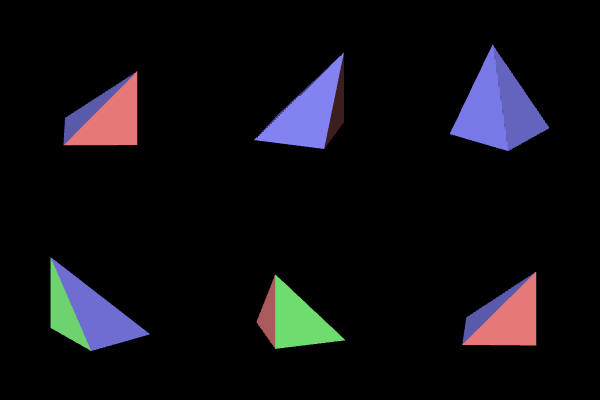 |
| 15 | S == V S <> T U == V U >= T | [T] [U] [0] [1] | 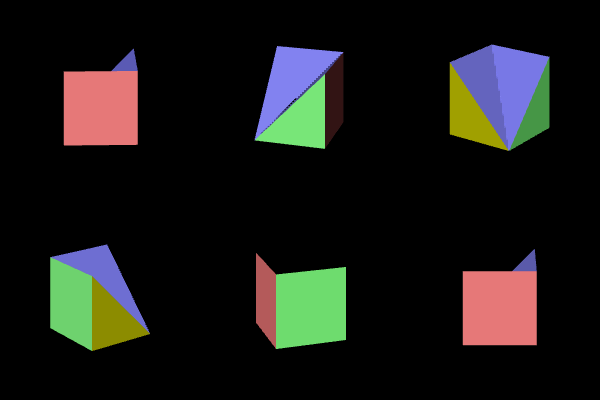 |
Note that shape 12a is catch-all, as it is allocated to any shapes that don't fit into the other numbers.
It is worth noting that:
- Shape 0 has four horizontal edges.
- Shapes 4 and 12b have one horizontal edge and three sloping edges.
- Shape 12a has either one or zero horizontal edges and either three or four sloping edges (the example above is the one with one horizontal edge).
- Shape 8 is unused.
- All other shapes (1, 2, 3, 5, 6, 7, 9, 10, 11, 14 and 15) have two horizontal edges and two sloping edges.
- Most shapes are simply rotations of others:
- Shapes 1, 5, 9 and 13 are all slopes.
- Shapes 2, 3, 7 and 15 are all gullies.
- Shapes 6, 10, 11, 14 are all ridges.
Let's finish off by looking at a few uses for the tile shape.
Uses for the tile shape
-----------------------
The tile shape is used in a number of places. Here's a complete list:
- The SpawnObjectBelow routine checks whether a tile is flat before spawning an object on it.
- The GetHighestTiles routine only matches flat tiles when trying to find the highest tiles for placing enemies.
- The FollowGazeVector routine uses the tile shape to work out whether or not a gaze is being obscured by a tile (see the deep dive on following the gaze vector for details).
- The DrawTileAndObjects routine uses the tile shape to decide how to draw a tile, using one of the following routines: DrawFlatTile, DrawOneFaceTile, DrawSlopingTile or DrawTwoFaceTile.
- The tileShapeOffset and viewingQuadrantx4 variables use the fact that most tile shapes are rotations of each other to support drawing of the landscape from different perspectives (see the deep dive on drawing the landscape view for more on this).
The tile shape is also used to fetch tile colours from the tileShapeColour table, triangle start points from the triangleStart table, and the mapping from tile shapes and gaze vector direction to tile edges in the tileEdges table.