Pitch and yaw angles are fundamental to the way The Sentinel works
There are two separate coordinate systems used in The Sentinel: pitch and yaw angles, and Cartesian coordinates. In this article, we take a look at pitch and yaw angles, which are central to the way the game implements gazing, rotation, enemy logic and the landscape-drawing process, to name just a few.
You can read all about the other system in the deep dive on Cartesian coordinates, and for an explanation on how the game converts coordinates between the two systems, see the deep dives on converting angles to coordinates and converting coordinates to angles.
Pitch and yaw angles
--------------------
The terms "pitch" and "yaw" are absolutely key aspects of the complex geometry that lies at the heart of The Sentinel; there are an awful lot of angles in this game, and understanding the orientation of those angles is vital.
So consider the Sentinel, standing alone on top of the Sentinel's tower and gazing out over the landscape:
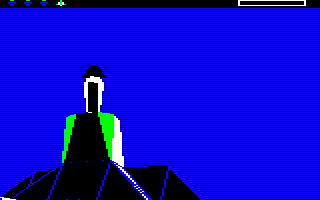
The direction of that gaze (which we call the "gaze vector") is defined by a pitch angle and a yaw angle, as follows:
- Pitch angle:
- The pitch angle defines the direction of the gaze in the vertical direction, so changing the pitch angle will rotate the Sentinel's gaze up or down.
- A higher, more positive pitch angle makes the Sentinel look up, while a lower, more negative pitch angles makes the Sentinel look down.
- The pitch angle rotates the Sentinel's gaze around the horizontal x-axis, where the x-axis goes from left to right.
- Changing the Sentinel's pitch angle effectively makes the Sentinel tilt its head backwards and forwards (although, being a rigid robot, it doesn't actually do this).
- If you are of an astronomical persuasion, an alternative name for pitch is "elevation".
- Yaw angle:
- The yaw angle defines the direction of the gaze in the horizontal direction, so changing the yaw angle will rotate the Sentinel's gaze left or right.
- A higher, more positive yaw angle makes the Sentinel look to the right, while a lower, more negative yaw angle makes the Sentinel look to the left.
- The yaw angle rotates the Sentinel's gaze around the vertical y-axis, where the y-axis goes from down to up.
- Changing the Sentinel's yaw angle rotates the Sentinel and its gaze to the left or the right, which you can see in-game if you look at the Sentinel once the game has fully started (so you will need to expend or absorb energy first). When the Sentinel changes yaw angle and rotates, it makes an eerie grinding sound.
- If you are of an astronomical persuasion, an alternative name for yaw is "azimuth".
Note that "pitch" and "yaw" are the same terms that we use to describe the spaceship angles in Elite, or the Spitfire angles in Aviator, or the car angles in Revs. The first two games also support the concept of a roll angle, which is a rotation around the z-axis (which goes into the screen), but this extra angle isn't needed in Revs or The Sentinel. Indeed, the angle system in The Sentinel is exactly the same as the angle system in Revs, and it uses the exact same underlying code; see the deep dive on reusing the geometry routines from Revs for details.
Now that we're clear on exactly which angle is which, let's take a closer look at how the pitch and yaw angles are managed in The Sentinel.
Angles in The Sentinel
----------------------
Angles in The Sentinel are stored as signed integers, representing a full circle in the range -127 to +128. If we consider an overhead view of the Sentinel, with the Sentinel's gaze looking upwards in the diagram, towards 0 degrees, then the range looks like this:
           0
     -32   |   +32
        \  |  /
         \ | /                 ^
          \|/                  |
  -64 -----+----- +64          +   Overhead view of the Sentinel,
          /|\                      looking forwards
         / | \
        /  |  \
     -96   |   +96
          128
So from the point of view of the Sentinel, positive yaw angles are to the right, negative yaw angles are to the left, and angles whose magnitude is greater than 64 are behind.
Similarly, if we consider a side view of the Sentinel with the Sentinel looking to the right in the following diagram, towards 0 degrees, then the range looks like this:
          +64
           |   +32
           |  /
           | /
           |/
           +----- 0            +---> Side view of the Sentinel,
           |\                        looking to the right
           | \
           |  \
           |   -32
          -64
So from the point of view of the Sentinel, positive pitch angles are up and negative pitch angles are down. The underlying system can cope with pitch angles whose magnitude is greater than 64 (in which case the Sentinel would be looking backwards), but in practice pitch angles are restricted to looking forwards, as even the Sentinel doesn't have eyes in the back of its head.
Along with the pitch and yaw angles, the game implements a Cartesian coordinate system for the tile landscape, which is described in the deep dive on Cartesian coordinates. To find out how to convert from one coordinate system to the other, see the deep dives on converting angles to coordinates and converting coordinates to angles.