Squeezing a landscape view into a custom-sized letterbox screen mode
To save memory and reduce the amount of work involved in scrolling the screen during gameplay, The Sentinel uses a custom screen mode. The customisations are pretty simple, especially compared to the sophisticated custom screens in Elite and Revs, but because The Sentinel depends on a screen buffer to produce such smooth scrolling graphics for the 3D landscape, it's useful to document exactly how the screen mode is structured.
In essence, The Sentinel uses a smaller version of the BBC Micro's standard screen mode 5. It provides the same horizontal four-colour graphics resolution as the original mode 5, but it uses fewer character rows to save screen memory. Specifically, it has only 25 character rows rather than the normal mode's 32 rows, which gives the game screen a distinctive letterbox appearance, particularly on the title screens, which only use 24 of those rows:
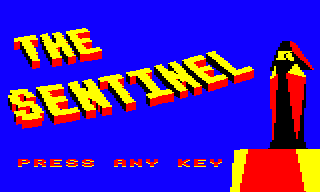
As each character row is eight pixels high, the custom mode therefore has a vertical resolution of 25 * 8 = 200 pixels, compared to the 256 pixels of standard mode 5. The horizontal resolution is the same at 160 pixels.
Screen memory for the custom mode runs from &6000 to &7FFF, with four pixels per byte and four colours per pixel. However, not all of this memory is used at any one time, as the total screen memory required is &1F40 bytes rather than &2000. In its default, unscrolled state, screen memory actually starts at &7F80 rather than &6000, but because the landscape view is panned using a hardware scroll, the entire section from &6000 to &7FFF ends up being used for screen memory as the landscape is panned.
During gameplay, the top character row is reserved for the energy icon and scanner row, leaving 24 rows for the landscape view:
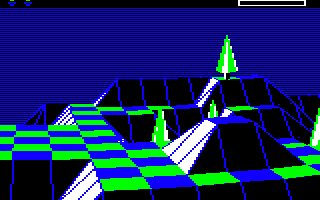
Prior to any scrolling, the address of the first row in the player's scrolling landscape view (i.e. the second row on-screen below the energy icon and scanner row) is &7F80 + 320, or &60C0 (as screen memory wraps around from &8000 back to &6000).
To support this skewed memory layout, there are two lookup tables at screenRowAddrHi and screenRowAddrLo that contain screen memory addresses for each of the 24 character rows in the player's scrolling landscape view.
Mode 5 screen memory
--------------------
The memory for the custom screen is structured in the same way as mode 5, with one byte representing four pixels. The screen buffers use the same memory layout too, so they can be copied directly into screen memory when the screen scrolls. The game updates both the screen and screen buffers by poking pixels directly into memory, so if you want to understand how the graphics routines work, you'll need to understand how the BBC Micro organises screen memory.
If we consider a pixel byte made up of eight bits like this:
01234567
then the first pixel is defined by bits 0 and 4, the second by bits 1 and 5, and so on. If we split it up into nibbles:
0123 4567
then the first pixel is defined by the first bits of each nibble (0 and 4), the second is defined by the second bits of each nibble (1 and 5), and so on with bits 2 and 6, and bits 3 and 7. So consider this character row byte:
1111 0000
Each of the four bits has a 1 as the first bit and a 0 as the second bit, giving %10, or 2, so this defines four pixels in a row of colour 2. And this one:
1010 0011
contains the following pixels: %10, %00, %11 and %01, so this is a four-pixel row consisting of pixel colours 2, 0, 3 and 1.
These four-pixel bytes are arranged in character blocks, with each character block containing eight bytes, one stacked above the other. This means each character block is four pixels wide by eight pixels high, and two neighbouring character blocks would like this:
        01234567 ->-.      ,------->- 01234567->-.
                     |    |                       |
   ,-------<--------´     |     ,-------<--------´
  |                       |    |
   `->- 01234567 ->-.     |     `->- 01234567 ->-.
                     |    |                       |
   ,-------<--------´     |     ,-------<--------´
  |                       |    |
   `->- 01234567 ->-.     |     `->- 01234567 ->-.
                     |    |                       |
   ,-------<--------´     |     ,-------<--------´
  |                       |    |
   `->- 01234567 ->-.     |     `->- 01234567 ->-.
                     |    |                       |
   ,-------<--------´     |     ,-------<--------´
  |                       |    |
   `->- 01234567 ->-.     |     `->- 01234567 ->-.
                     |    |                       |
   ,-------<--------´     |     ,-------<--------´
  |                       |    |
   `->- 01234567 ->-.     |     `->- 01234567 ->-.
                     |    |                       |
   ,-------<--------´     |     ,-------<--------´
  |                       |    |
   `->- 01234567 ->-.     |     `->- 01234567 ->-.      ^
                     |    |                       |     :
   ,-------<--------´     |     ,-------<--------´      :
  |                       |    |                        |
  `->- 01234567 ->------´      `->- 01234567 ->-------´
The screen is made up of character rows, each of which is a screen-wide row of character blocks. The custom screen mode is 160 pixels wide and 200 pixels high, so each character row contains 40 character blocks (as each block is 4 pixels wide and 160 = 40 * 4, and there are 25 character rows (as each row is 8 pixels high, and 256 = 25 * 8).
The custom screen mode
----------------------
The ConfigureMachine routine is responsible for setting up this custom screen mode, which it does by reprogramming the registers in the 6845 CRTC chip, one of the chips that is responsible for creating the BBC Micro's screen display (the other chip being the Video ULA).
The screen mode is the same as mode 5, but with the following differences:
| Register | Details | Mode 5 | The Sentinel |
|---|---|---|---|
| R6 | Vertical displayed | 32 | 25 |
| R7 | Vertical sync position | 34 | 32 |
| R10 | Cursor start | %01100111 | %00100000 |
| R12, R13 | Screen memory start | &5800 | &7F80 |
The cursor start setting simply disables the cursor, while the R6 and R7 registers change the screen height and adjust the position of the custom screen's vertical sync.
The R12 and R13 registers are responsible for setting the address of the start of screen memory. When the game scrolls the landscape view, it does so by reprogramming these registers; this is called "hardware scrolling", as it uses the hardware to scroll the screen contents (see the deep dive on panning and hardware scrolling for details). The following routines affect these registers:
- The screen address is reset to &7F80 by the ResetScreenAddress routine, which is called by the ClearScreen whenever we clear the screen. So clearing the screen also resets any hardware scrolling that's been performed.
- The ScrollPlayerView routine updates R12 and R13 to scroll the screen in the interrupt handler, so this is where the screen is actually scrolled when the player is panning the screen.
There is one more step that is done in the ConfigureMachine routine when setting up the system, and that is to configure the machine for hardware scrolling. For this we need to program the 6522 System VIA chip with a number that's added to the start of screen memory in hardware to control the hardware scrolling, and we do this by setting addresses B4 and B5 via the System VIA's addressable latch.
Between them, B4 and B5 control the address of the start of screen memory and the screen size. The code sets VIA address %101 to 1 (to set B5 to 1) and address %100 to 0 (to set B4 to 0), and this sets screen memory to start at &6000 and the screen size to 8K. See page 419 of the "Advanced User Guide for the BBC Micro" by Bray, Dickens and Holmes for more details.