The plate carrée equirectangular projection used in The Sentinel
Back in the day, The Sentinel was best-known for its 3D scrolling landscape; the game's deep and subtle gameplay was perhaps less apparent to casual observers, even though contemporary reviewers were clearly captivated by its eerie uniqueness. But fully filled 3D graphics were a bit of a rarity on 8-bit computers, and even though the panning process isn't in real time and scrolls the screen in rather noticeable steps, the graphics in The Sentinel were highly praised in 1986 and they still hold up today.
The panning process is very clever and uses screen buffers and hardware scrolling to get around the speed restrictions of the 8-bit hardware to produce the scrolling landscape view... but none of this would be possible without the projection system that underpins the entire panning process, and that's what we're going to look at here.
Thank you, Revs
---------------
The Sentinel gets all the plaudits for its scrolling landscape view, and quite rightly too, but I'm here to fly the flag for the real hero, because it isn't The Sentinel that we should be praising, but Revs, Geoff Crammond's previous game.
This is what Revs looks like:
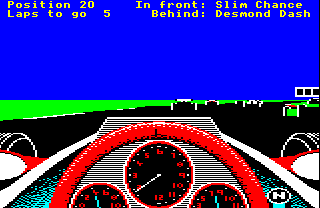
In this case, we're on the starting grid at Silverstone waiting for the lights to change and the race to start. If we hack the game at this point to change the direction of the camera, then we can take a bunch of screenshots at lots of different camera angles and stitch them together to give us a 360-degree headcam shot, like this:

This image is probably a bit small, especially if you're reading this on a mobile, but you can click on the image to see it in its full glory; and if you're on a touchscreen device, you should be able to zoom in on the image as far as you like. To give you a sense of just how big this panorama is, here it is with the original starting screen highlighted:

When we hack the game to change the yaw angle of the camera, then this effectively moves this red rectangle left and right across the panorama. This means that if we wanted to, we could scroll the in-game view by a small amount and simply tack the new part of the view onto the sides (though Revs doesn't do this, it's just something that the projection system supports).
The exact same hack works with The Sentinel, but this time we can move the camera both horizontally and vertically. Here's a panorama made up of screenshots from landscape 0000, giving us an almost complete 360-degree shot in both the yaw and pitch axes (though the pitch range isn't quite a full circle, as we'll discuss below):
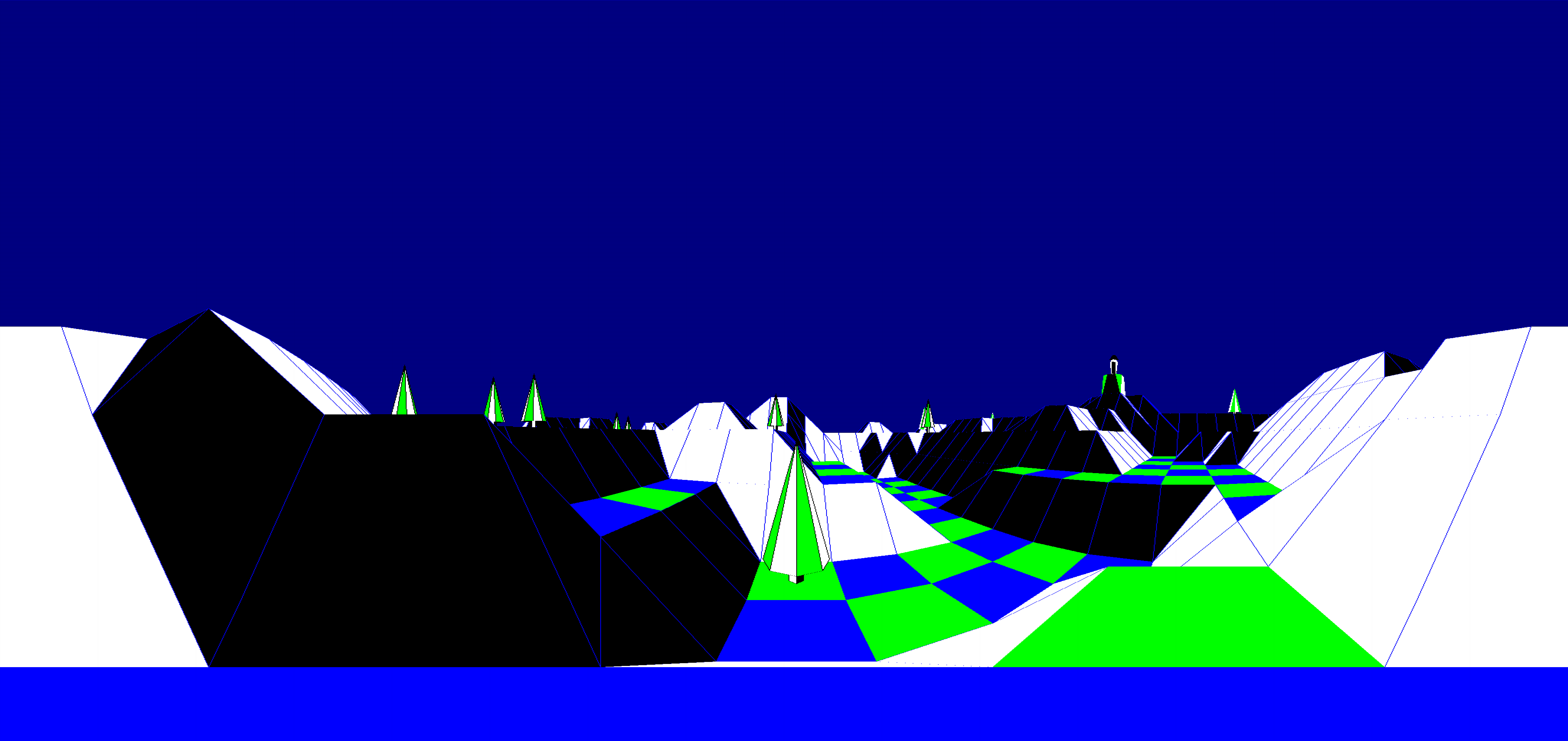
This view is quite extensive compared to the horizontal strip in Revs; here it is with the opening screen highlighted:
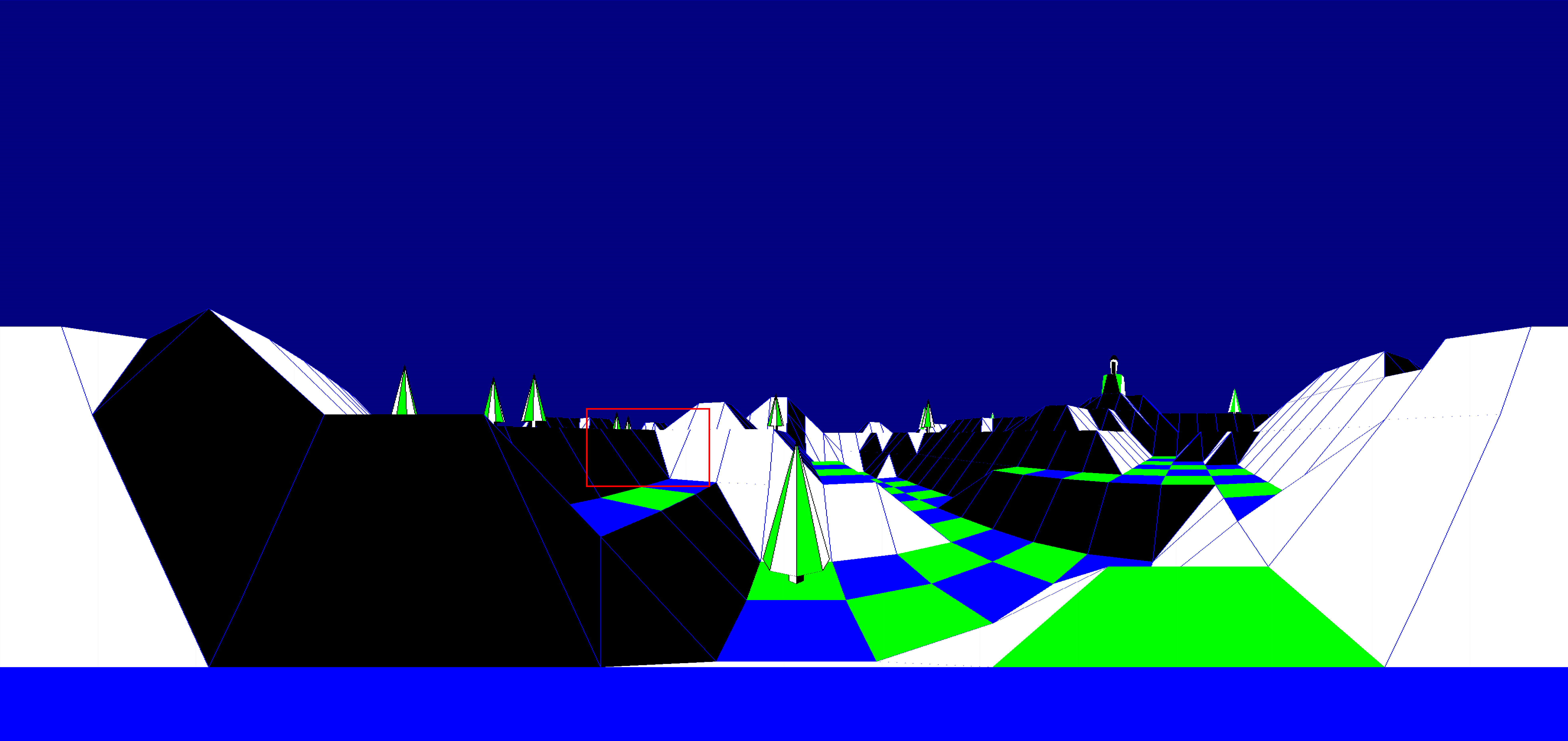
The similarities are clear, even if The Sentinel's world is far larger and more detailed. Revs pioneered the pitch and yaw angle system that is used in The Sentinel, and the core maths routines in the latter game are lifted straight from its predecessor - see the deep dive on reusing the geometry routines from Revs for details. And this isn't the only aspect that The Sentinel pinches from Revs, because it also uses the same projection system.
Before we look at the details of the projection system, let's see why it's so vital to the way The Sentinel works. The game manages to implement scrolling of filled 3D graphics by scrolling the screen a bit at a time: when the players holds down a pan key, the game starts busily drawing a small strip of landscape that can be tacked onto the sides (for horizontal pans) or onto the top or bottom of the landscape view (for vertical pans). This process is described in the deep dive on panning and hardware scrolling, and the reason that it's possible is because The Sentinel borrows the projection system from Revs.
Known as the "equirectangular projection", this method of converting 3D world coordinates into 2D screen coordinates has one vital characteristic: the perspective of the view doesn't change with the viewing direction. This is not true of things like humans and cameras; if you have ever gone on holiday and taken a bunch of photos of a beautiful view, and then you've tried to stitch those photos together to make a panorama, then you'll know that they don't slot together neatly at all. This is because the perspective of the camera lens - just like the human eye - is focused around the centre of the shot, and each photo has its own subtle fisheye lens effect that means they don't sit together correctly.
If we were redrawing the entire landscape view in The Sentinel every time we panned, then this perspective shift wouldn't be a problem, but because we have to take a strip from the "neighbouring photograph" and scroll that into view, things would get messy pretty quickly if we were to use a normal projection system.
Luckily the equirectangular projection that Revs uses doesn't suffer from this problem, and instead individual parts of the projected world slot together perfectly, making it a perfect fit for The Sentinel. Revs doesn't actually care whether different images fit together as it redraws the whole screen for each frame, but it turns out that this unused aspect of the Revs graphics engine makes The Sentinel possible.
So, thank you, Revs. We owe you one.
The plate carrée equirectangular projection
-------------------------------------------
All 3D games have some kind of projection system that takes coordinates from the 3D world and projects them onto the 2D screen. The most common approach in 8-bit games is the simple perspective projection, in which we convert 3D coordinates to 2D coordinates by simply dividing the x-coordinate (left-right) and y-coordinate (up-down) by the z-coordinate (into and out of the screen):
  screen_x = x / z

  screen_y = y / z
This is the approach used in both Elite and Aviator: in Elite, the projection logic is in the PROJ routine, while in Aviator it's in the ProjectPoint routine. At the core of each routine is simple division by the z-coordinate, giving us a screen coordinate that we can scale appropriately to fit on-screen. For more details of the maths behind this projection, plus lots of information about other types of projection, see the Wikipedia article on the perspective projection.
However, Revs and The Sentinel don't use this simple perspective projection. Instead, the 3D world is calculated using pitch and yaw angles, which then double up as screen coordinates. The technical name for this projection system is the plate carrée equirectangular projection, which is a special case of the equirectangular projection that maps pitch angles to latitude and yaw angles to longitude. For more information about this projection, see the Wikipedia entry on the equirectangular projection.
In practice, because of the close relationship between the angles and screen coordinates, it's often easier just to think of them as equivalent terms, like this:
- Yaw angle = azimuth angle = x-coordinate = distance across the screen = left (-ve) to right (+ve) coordinate
- Pitch angle = elevation angle = y-coordinate = distance up the screen = down (-ve) to up (+ve) coordinate
In reality things are a bit more subtle than this implies, but when trying to get your head around the coordinate system in The Sentinel, it's a handy shortcut.
Projection in The Sentinel
--------------------------
Projection in The Sentinel is the same as projection in Revs, but with one difference: the screen in The Sentinel has half the field of view of Revs. In Revs the screen width covers a yaw angle range from -20 to +20, but in The Sentinel the range is -10 to +10, giving a much more claustrophobic feeling compared to the widescreen vista that you need in a racing game. Also, the pitch angle range in The Sentinel is much bigger than in Revs, because the latter doesn't draw anything in the blue sky, and most of the black track you can see in the above panorama is hidden by the car's dashboard. The Sentinel, however, has a full landscape view in all directions, even if the letterbox screen itself has a relatively small field of view.
To convert angles to screen coordinates, we consider the origin to be in the centre of the screen, and then we simply move and scale the relevant angle. So, for example, in the x-axis, we take the yaw angle of the point we want to project and add the yaw angle offset of the middle of the screen to move it into the screen's yaw angle range (so that it's now relative to the left edge of the screen rather than the centre, to match the screen's coordinate system). We then multiply the result by 8 to convert the yaw angle into screen coordinates, by applying the equirectangular projection to the point. You can see this projection process in part 3 and part 4 of GetPolygonLines, for example.
This means that the field of view from the player's perspective is from -10 to +10 units of yaw angle, so that's -14.0625 to +14.0625 degrees, or 360 * 10 / 256 degrees in each direction, giving a total field of view arc of 28.125 degrees; everything outside of this range is either off-screen or behind us. It also means that we can think of the yaw angle as being equivalent to the projected x-coordinate, and the pitch angle as being equivalent to the projected y-coordinate.
In terms of pitch and yaw angles, we therefore have the following equivalences in the horizontal x-axis:
- The screen is 20 yaw angles wide.
- The screen is 40 character columns wide, so we can double the yaw angle to get the column number.
- The screen is 160 pixels wide, so we can multiply the yaw angle by 8 to get the pixel x-coordinate, as 8 * 20 = 160.
- 20 yaw angles is 360 * 20 / 256 = 28.125 degrees, so the horizontal viewing angle of the screen is 28.125 degrees.
And here's the same for the vertical y-axis:
- The screen is 12 pitch angles tall.
- The screen is 24 character rows tall, so we can double the pitch angle to get the row number.
- The screen is 192 pixels tall, so we can multiply the pitch angle by 16 to get the pixel y-coordinate, as 16 * 12 = 192.
- 12 pitch angles is 360 * 12 / 256 = 16.875 degrees, so the vertical viewing angle of the screen is 16.875 degrees.
Converting directly from pitch and yaw angle into screen coordinates works because the in-game landscape view in The Sentinel is quite restricted. The equirectangular projection adds a very noticeable fisheye effect to the whole landscape view, which is really obvious in the panorama above, but this isn't remotely easy to spot in the individual screen-sized rectangles.
Indeed, the fact that the game makes you scroll through this landscape view in tantalisingly small steps is all part of the psychology of the game. Let's look at the horizontal steps in a sideways pan:
- It takes 32 horizontal pans to rotate all the way around through 360 degrees.
- Each yaw step moves the view sideways by 8 yaw angles, or 8 * 8 = 64 pixels.
- The landscape view itself is 2.5 steps wide. It is 160 pixels wide, and 160 = 2.5 * 64.
- The entire landscape width is therefore 32 * 64 = 2048 pixels wide.
And now let's consider the vertical steps in an up or down pan:
- It takes 27 vertical pans to rotate all the way from the top view to the bottom.
- When showing the top and bottom views, the screen shows one more pan height in each direction (though the sights can't move over these extra steps), so the height of the viewable landscape is 29 vertical pans.
- Each pitch step moves the view up or down by 4 pitch angles, or 4 * 16 = 64 pixels.
- The landscape view itself is 3 steps high. It is 192 pixels tall, as 192 = 3 * 64.
- The entire landscape height is therefore 29 * 64 = 1856 pixels high, of which we can interact with 27 * 64 = 1728 pixels.
- The highest pitch angle that you can pan to is +53, which is set in the highestPitchAngle variable. This equates to a pitch angle of 360 * 53 / 256 = +74.53125 degrees.
- The lowest pitch angle that you can pan to is -51, which is set in the lowestPitchAngle variable. This equates to a pitch angle of 360 * -51 / 256 = -71.71875 degrees.
To demonstrate just how many individual screens make up the full landscape, here's the panorama with all the possible positions of the top-left corner of the viewing screen marked with crosses:
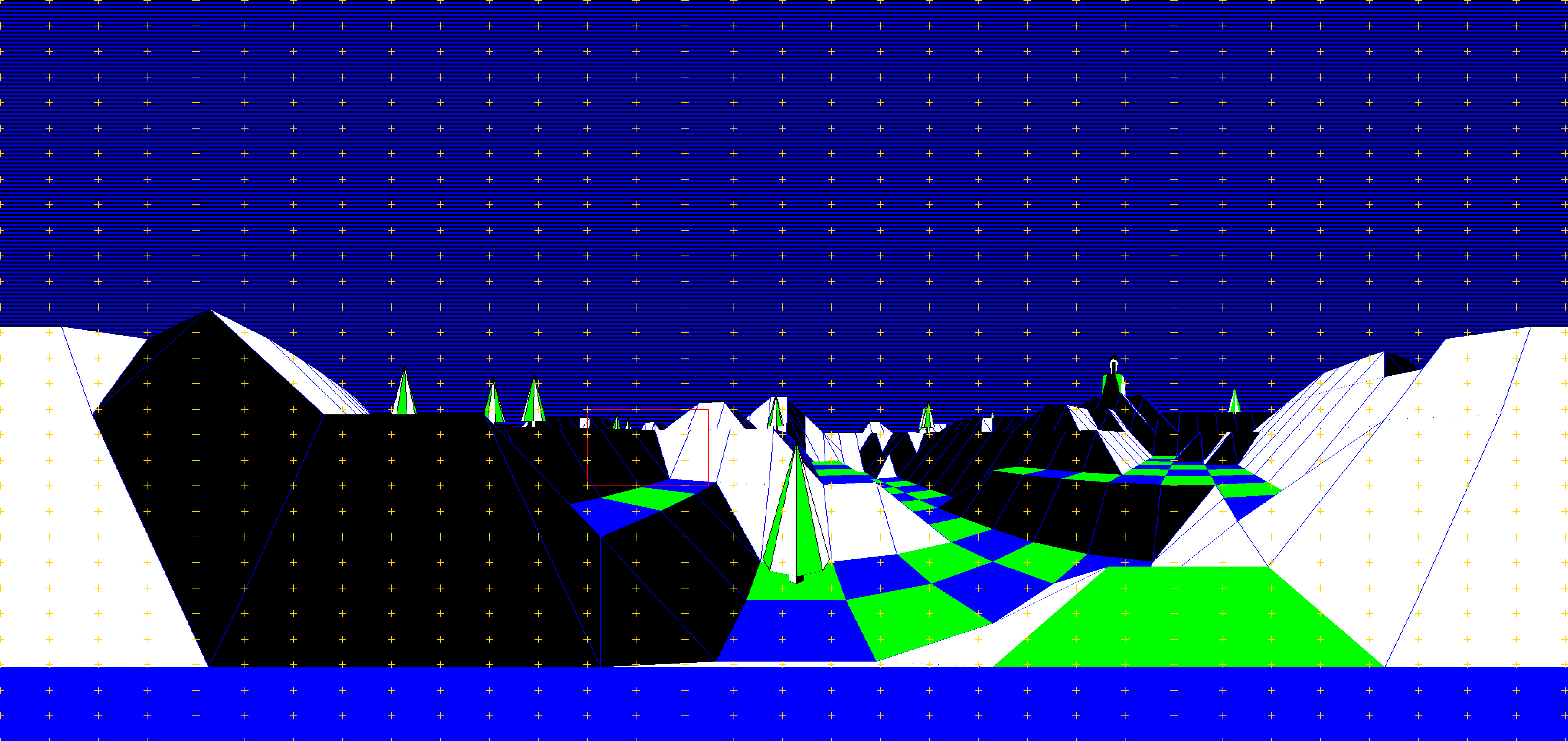
Note that these panorama images for The Sentinel are at a higher resolution than the game itself. I created them by using the b2 emulator's screenshot function and then stitching the results together in ImageMagick, which works well, but because b2 saves the screen out at a higher resolution than the game and with some pre-applied scaling that can't be disabled, this means the panorama shots are 7856 x 3712 pixels in size, rather than the in-game resolution of 2048 x 1856 pixels. It also means there are some scaling artifacts in there too, just in case you zoom in that far...