The tile landscape uses Cartesian coordinates to define its shape
There are two separate coordinate systems used in The Sentinel: pitch and yaw angles, and Cartesian coordinates. In this article, we take a look at Cartesian coordinates, which are used for the tile landscape, 3D object placement and vector tracing, amongst others.
You can read all about the other system in the deep dive on pitch and yaw angles, and for an explanation on how the game converts coordinates between the two systems, see the deep dives on converting angles to coordinates and converting coordinates to angles.
The landscape structure
-----------------------
The most obvious use of Cartesian coordinates in The Sentinel is the 3D landscape on which the game is played. You can see the whole landscape in the preview at the start of each game, like this:
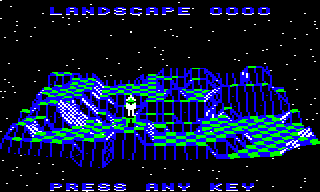
For the landscape, The Sentinel uses a left-hand coordinate system, with the x-axis pointing from left to right, the y-axis pointing up, and the z-axis pointing into the screen. It's called a "left-hand" system because if you take your left hand and point your thumb, index and middle fingers at right angles to each other, then each of your fingers will point in the same direction as each of the three axes. Elite, Revs and Aviator all use the same left-hand coordinate system because the x- and y-axes of the 3D world match the x- and y-axes of the computer screen, which is the coordinate system that most home computer users would have been familiar with. The z-axis therefore adds the third dimension to the standard 2D world by pointing into the screen and adding depth.
(As an aside, we know that The Sentinel has its axes set up this way because of the order of the 3D variables within the game. We don't know what Geoff Crammond actually called any of his variables as the original source code has never been released, so we can't be 100% sure that he called the axis that goes into the screen the "z-axis". However, when it comes to coordinate variables like xCoordHi, yCoordHi and zCoordHi, then if we assume that he used the traditional left-hand coordinate system, it means these variables appear in memory in the logical order x then y then z. Given how tidy Crammond's code is, it feels like a safe assumption that he would order his variables correctly, so the left-hand coordinate system is clearly the winner.)
As the landscape runs into the screen and away from us, points on the landscape can be described by an x-coordinate (for left to right) and a z-coordinate (for going into the screen). The altitude of a point on the landscape is therefore the y-coordinate of that point (for the up-down axis), so each point on the landscape can be described as a Cartesian coordinate, i.e. (x, y, z). If you imagine the landscape being a paper map, then the x- and z-coordinates are the longitude and latitude for points on the map, and the y-coordinate is the contour value shown on the map.
More specifically, the landscape in The Sentinel is defined using the concept of "tiles"; the whole landscape is like an undulating chess board that's sitting on a table in front of us, going into the screen. Some of the tiles are obvious - the flat green-and-blue checkerboard plateaus show the tiles clearly - but tiles in The Sentinel don't have to be flat, and in fact come in all shapes and sizes (see the deep dive on tile shapes for details).
The landscape is therefore made up of rows (x-axis) and columns (z-axis) of tiles. Each tile row runs along the x-axis from left to right, and each tile in a row shares the same z-coordinate; so row 0 at the front contains tiles with a z-coordinate of 0, with the x-coordinates running from 0 on the left to 30 on the right. Similarly, each tile column consists of tiles with the same x-coordinate, with the z-coordinates running from 0 in the front to 30 at the back, so column 0 on the left contains tiles with an x-coordinate of 0.
Each tile consists of four tile corners, and each of those tile corners has its own altitude (y-axis). So the landscape is actually stored as a 32x32 grid of tile corner coordinates, giving us a 31x31 grid of 3D tiles. Let's take a deeper look at these coordinates.
The tile coordinate system
--------------------------
To make things easy to work with, each tile corner is defined as lying on an integer x-coordinate and z-coordinate, so each tile is exactly one x-coordinate wide and one z-coordinate deep. If you viewed the landscape directly from above, then it would look like a chess board, albeit with 31x31 square tiles (the view in the landscape preview doesn't show the depth too well, but the landscape is actually square, being 31 tiles across and 31 tiles deep). When looking from above, you would be looking down onto a landscape made up of rows and columns of square tiles, each of which is made up of four tile corners, each of which is on a whole-number coordinate.
By way of an example, consider the bottom-left corner of the preview, here:
The front row of tiles slopes down towards us, and just behind that is a row of flat blue and green tiles, with another set of slopes behind that. This is what the corner looks like in terms of tile coordinates, looking from above:
                               Back of landscape

                     :        :        :        :        :
                     :        :        :        :        :
                   3 +--------+--------+--------+--------+ ...
                     |        |        |        |        |
                     | Slope  | Slope  | Slope  | Blue   |
                     | (0, 2) | (1, 2) | (2, 2) | (3, 2) |
                   2 +--------+--------+--------+--------+ ...
             ^       |        |        |        |        |
             |       | Blue   | Green  | Blue   | Green  |
           z-axis    | (0, 1) | (1, 1) | (2, 1) | (3, 1) |
                   1 +--------+--------+--------+--------+ ...
                     |        |        |        |        |
                     | Slope  | Slope  | Slope  | Slope  |
                     | (0, 0) | (1, 0) | (2, 0) | (3, 0) |
                   0 +--------+--------+--------+--------+ ...
                     0       1       2       3       4

                                   x-axis -->

                               Front of landscape
As you can see, tiles are always placed on integer x- and z-coordinates, and a tile's coordinate is the same as the coordinate of its front-left corner (so we often talk about tiles being anchored to this tile corner).
Of course, we don't view the landscape directly from above in The Sentinel, and in the preview you can see that each part of the landscape has a different altitude, creating the peaks and valleys of the Sentinel's world. This altitude is given in the y-coordinate, while the positions of the square tiles are given by the x-coordinate and z-coordinate.
As far as the landscape is concerned, the tile altitude given in the y-coordinate is also an integer, so all flat areas of the landscape are on integer altitudes. This means that the difference in altitude between flat tiles is always one y-coordinate. In the above example, the flat tiles are all at altitude of 7. In essence, each landscape is generated by setting an integer altitude for each tile corner; see the deep dive on generating the landscape for more details.
Fractions
---------
Although tiles and tile corners always live on integer coordinates, fractions are used all the time. As a result, coordinates are stored as multi-byte values, typically with two fractional bytes like this:
- xCoord(Hi Lo Bot)
- zCoord(Hi Lo Bot)
- zCoord(Hi Lo Bot)
In this case the high byte in can be thought of as the integer, so the tile coordinate is (xCoordHi, yCoordHi, zCoordHi), and the low and bottom bytes contain the fractional part.
For example, when we are analysing an object that has been placed on a tile, we can assume that it has been put in the middle of the tile, which we can simulate by setting the fractional part to 0.5. So if we place an object onto the rightmost green tile in the example above, which has tile coordinate (3, 1), then the object itself would be at tile coordinate (3.5, 1.5), using the following values:
- xCoord(Hi Lo Bot) = (3 128 0)
- zCoord(Hi Lo Bot) = (1 128 0)
The 128 represents 0.5 because 128 / 256 = 0.5. We don't actually need to store this fractional part, as all objects are placed in the middle of their tiles, so object tile x- and z-coordinates are stored as integers. But when it comes to calculating how close to an object the crosshair sights are, for example, we can add in the fractional part by simply tacking on the low and bottom bytes.
The same fraction system applies to the y-axis, but this time we do keep track of each object's altitude. For example, when objects are spawned and placed on tiles, they are actually placed at a height of 0.875 coordinates above the tile coordinate (this is implemented with a fractional byte of 224, as 224 / 256 = 0.875). This height is used for tracing the gaze vector, so it effectively defines the position of the object's eyes. This means that by default, the player can't see tiles at higher altitudes than their own tile, as the player's eyes are at a height of 0.875 above the player's tile and all higher tiles are at a height of at least 1.0 above the player's tile (though if the player stands on a boulder, this adds 0.5 to the player's altitude, so the player's eyes are now at a height of 1.375 above the player's tile, so they can now see onto tiles at the next altitude level up).
Similarly boulders are defined with a height of 0.5 y-coordinates, so if an object is placed on top of a boulder, it will be 0.5 y-coordinates higher than if it were placed directly on the tile.
As a final example, when we're trying to work out whether the player can see a specific tile, we follow the gaze vector in the FollowGazeVector routine. The calculations for normal tiles insist that for a hit to be registered, the gaze must be no more than half a y-coordinate below the tile's surface, but for the Sentinel's tower the gaze must be no more than 0.0625 of a y-coordinate below the surface. This means the player can't just look at the side of the tower and perform an action (though they can interact with a tiny slither at the top of the tower - the top 6.25%).
The default value of half a y-coordinate matches the height of the boulder, so this means the player can look at the sides of a boulder and interact with the object on the top of the boulder (so you can absorb or create objects on a boulder without being able to see the top of the boulder, but you can't do the same with the Sentinel's tower). These accuracies are encapsulated in the yAccuracyLo variable, which is set to 128 (i.e. 128 / 256 = 0.5 y-coordinates) by default, but is set to 16 (i.e. 16 / 256 = 0.0625 y-coordinates) for the Sentinel's tower.
Interestingly, the code doesn't check whether the player is looking at a boulder for this calculation, so in theory the player can interact with the top half of standard tiles as well. However, this isn't possible, as tiles don't stand alone, but instead all tiles have neighbouring tiles whose surfaces will obscure the gaze vector before it can reach the sides of the tile cube.
See the deep dive on following the gaze vector for more details of this particular rabbit hole...